

So funktioniert es
Zoom-Meeting wie gewohnt beitreten
Nichts ändert sich an Ihrer Zoom-Nutzung. Verwenden Sie die Desktop-App oder den Browser — Localingo funktioniert parallel zu beiden.
Bildschirmton-Zugriff erlauben
Keine Installation, keine Plugins, kein Bot. Öffnen Sie Localingo in einem Browser-Tab und erlauben Sie den Bildschirmton-Zugriff, wenn der Browser fragt — mehr braucht es nicht, damit die Übersetzung beginnt.
Jedem Wort folgen — in Ihrer Sprache
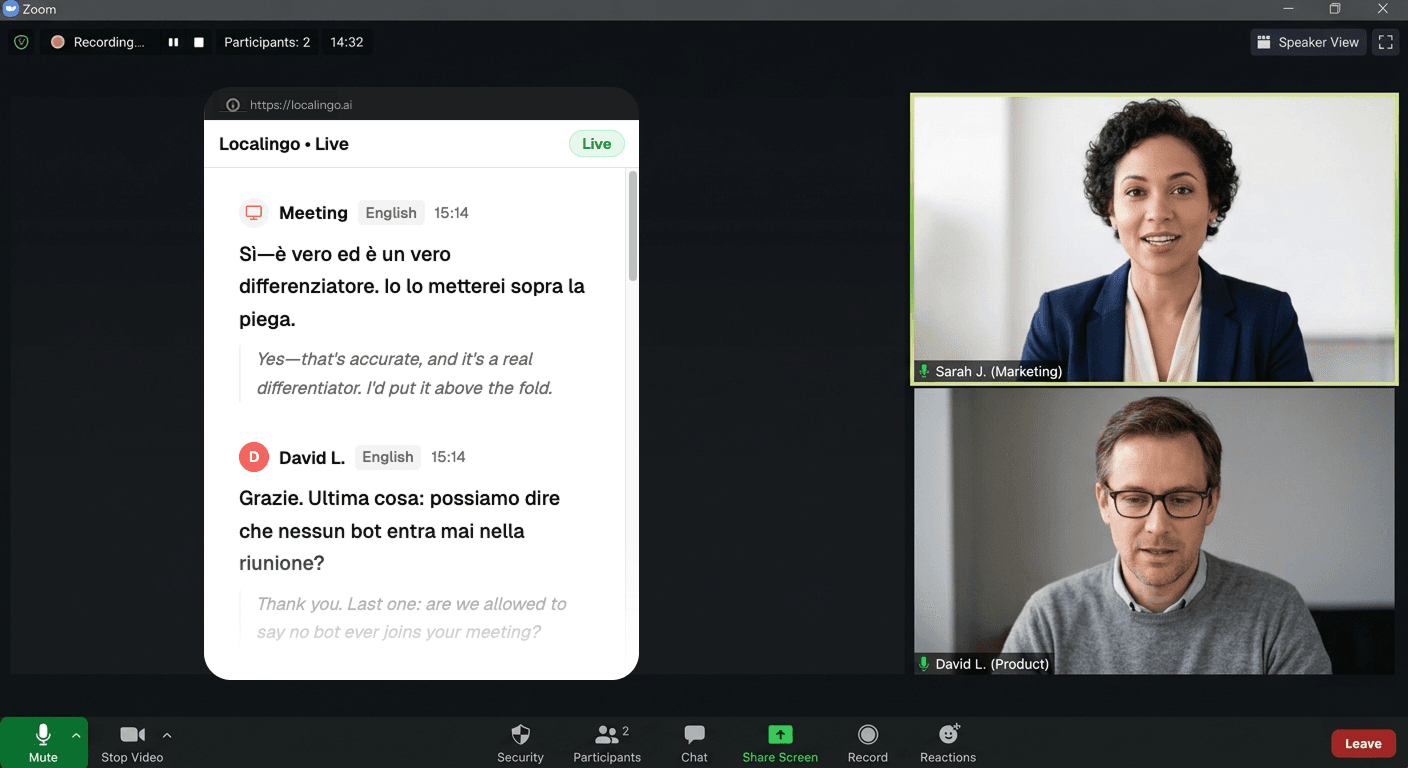
Live-Untertitel erscheinen, sobald jemand spricht, in Echtzeit in Ihre Sprache übersetzt. Notizen hinzufügen. Alles wird in Ihrem Meeting-Verlauf gespeichert.
Was Sie parallel zu jedem Zoom-Meeting erhalten
Jedes Wort übersetzt, während es gesprochen wird
Ihr Zoom-Meeting wird innerhalb von Sekunden transkribiert und in Ihre Sprache übersetzt — über 90 Sprachen hinweg — damit Sie jedem Wort in Echtzeit folgen, nicht einer nachträglichen Zusammenfassung.
Jedes Meeting gespeichert — Transkript und Übersetzung in Ihrer Sprache
Nach dem Meeting finden Sie das vollständige Transkript und die Übersetzung in Ihrem Dashboard. Zoom AI Companion fasst in der Sprache zusammen, in der das Meeting stattfand. Localingo speichert alles bereits in Ihre Sprache übersetzt — von jeder Plattform, die Sie nutzen — als Grundlage für KI-gestützte Notizen und Suche.
Your past meetings, saved and searchable.
Today
2Yesterday
2Sichtbar, während Sie Zoom nutzen
Der Picture-in-Picture-Modus hält Untertitel und Übersetzungen sichtbar, auch wenn Zoom im Vordergrund ist. Wechseln Sie frei zwischen Fenstern — die Untertitel folgen Ihnen.
Zooms Übersetzung: auf 36 Sprachen begrenzt, nur für zahlende Konten.
Sprachunterstützung endet bei 36
Zooms übersetzte Untertitel decken 36 Sprachen ab — weniger als die Hälfte dessen, was Localingo unterstützt. Der neuere Voice Translator ist noch in der Betaphase und auf gerade einmal 5 Sprachen beschränkt. Für viele Regional- oder weniger verbreitete Sprachen bietet Zoom schlicht keine Option.
Kostenpflichtiger Plan erforderlich, nur für US-Konten
Übersetzte Untertitel setzen ein kostenpflichtiges Zoom-Konto voraus. Der Voice Translator ist auf US-amerikanische Konten beschränkt und funktioniert ausschließlich in der Zoom-Desktop-App. Localingo funktioniert mit jedem Zoom-Konto, in jedem Land, direkt im Browser-Tab.
Zoom-KI kennt nur Zoom — und nur in der Meeting-Sprache
Zoom AI Companion fasst Meetings in der Sprache zusammen, in der sie stattfanden. War Ihr Meeting auf Französisch, ist Ihre Zusammenfassung auf Französisch. Und das nur für Zoom-Meetings. Localingo speichert jedes Meeting bereits in Ihre Sprache übersetzt — plattformübergreifend — damit Ihre Notizen nach dem Meeting auch wirklich lesbar sind.
Localingo vs. Zooms integrierte Übersetzung
| Funktion | Localingo | Zoom integriert |
|---|---|---|
| Übersetzung ohne kostenpflichtigen Plan | ✓ | Nur Business+ |
| 90+ Sprachen | ✓ | Begrenzt |
| Funktioniert mit jeder Meeting-App | ✓ | Nur Zoom |
| Mitschriften | ✓ | ✗ |
| Meeting-Verlauf | ✓ | ✗ |
| KI-Notizen in Ihrer Sprache | ✓ | Nur Meeting-Sprache |
| Kein Bot tritt dem Meeting bei | ✓ | ✓ |
| Kostenlos starten | ✓ | ✓ |
Im nächsten Zoom-Meeting testen.
Kostenlos starten. Keine Kreditkarte, kein Bot, keine Einrichtung.
Sie haben bereits ein Transkript? Kostenlos übersetzen →