

작동 방식
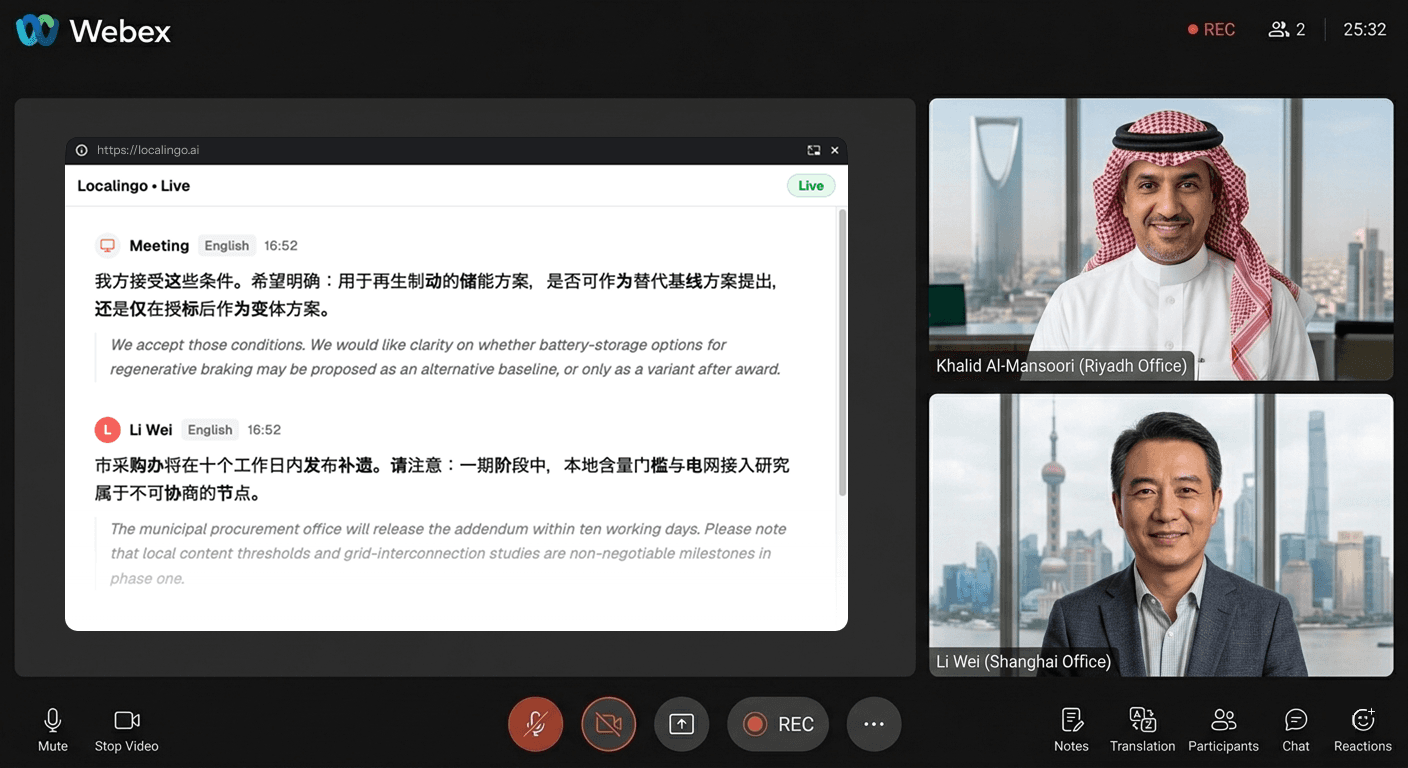
평소처럼 Webex 통화에 참여하세요
Webex 사용 방식은 아무것도 바뀌지 않습니다. 데스크톱 앱이든 브라우저든 상관없이 Localingo가 나란히 작동합니다.
안내가 표시되면 화면 오디오를 허용하세요
설치도, 플러그인도, 통화에 참여하는 봇도 없습니다. 브라우저 탭에서 Localingo를 열고 브라우저가 요청할 때 화면 오디오 접근을 허용해 주세요 — 번역을 시작하는 데 필요한 것은 그게 전부입니다.
모든 발언을 내 언어로 확인하세요
사람들이 말하는 동안 실시간 자막이 표시되고, 내 언어로 실시간 번역됩니다. 모든 내용은 회의 기록에 저장됩니다.
모든 Webex 통화에서 함께 제공되는 기능
말하는 순간 모든 발언이 번역됩니다
Webex 통화가 몇 초 안에 전사되고 내 언어로 번역됩니다 — 90개 이상의 언어 지원. 뒤늦은 요약이 아니라, 말하는 그 순간 모든 내용을 따라갈 수 있습니다.
모든 회의가 저장됩니다 — 전사 기록과 번역을 내 언어로
통화가 끝나면 모든 Webex 세션이 대시보드에 남습니다 — 전체 전사 기록, 번역, 검색 가능한 기록까지. Webex의 AI 요약은 회의에서 사용된 언어로만 생성되며 번역 옵션이 없습니다. Localingo는 어떤 플랫폼의 회의든 모든 내용을 내 언어로 저장해, AI 기반 회의록과 검색에 바로 활용할 수 있습니다.
Your past meetings, saved and searchable.
Today
2Yesterday
2Webex를 사용하는 동안에도 화면에 유지됩니다
PIP(화면 속 화면) 모드를 사용하면 Webex가 앞에 떠 있어도 자막과 번역이 계속 보입니다. 창을 자유롭게 전환하세요 — 자막이 따라다닙니다.
Webex의 번역: 음성 인식 16개 언어, 유료 애드온, 관리자 승인까지 필요합니다.
IT 관리자가 켜 줘야 합니다
Webex의 실시간 번역은 별도로 구매하는 라이선스입니다. IT 관리자가 이를 구매해 계정에 할당하고, 설정에서 Webex Assistant를 활성화해야만 사용할 수 있습니다. 스스로 켤 수 있는 기능이 아닙니다. Localingo는 여는 순간부터 어떤 Webex 계정에서도 작동합니다.
데스크톱 전용, 음성 인식은 16개 언어뿐
번역은 Webex 브라우저 앱에서는 작동하지 않고 데스크톱 앱 전용입니다. 게다가 입력 측에서 인식하는 음성 언어는 16개뿐입니다. 화자의 언어가 그 목록에 없으면 번역할 대상 자체가 없습니다. Localingo는 90개 이상의 음성 언어를 지원하며 회의가 어디에서 열리든 작동합니다.
AI 회의록은 회의 언어로만 나오고, Webex 회의만 지원합니다
Webex의 AI 요약은 회의가 진행된 언어로 생성됩니다. 통화 중에 번역이 필요했다면 회의록에서도 다시 번역이 필요합니다. 게다가 그 회의록은 Webex 회의만 다룹니다. Localingo는 어떤 플랫폼의 회의든 모든 내용을 내 언어로 저장합니다.
Localingo vs Webex 기본 번역
| 기능 | Localingo | Webex 기본 기능 |
|---|---|---|
| IT 승인 없이 번역 | ✓ | 애드온 라이선스 필요 |
| 90개 이상의 음성 언어 | ✓ | 음성 16개 |
| 모든 회의 앱과 호환 | ✓ | Webex 전용 |
| 회의 기록 | ✓ | ✗ |
| 내 언어로 AI 회의록 | ✓ | 회의 언어만 |
| 통화에 봇이 참여하지 않음 | ✓ | ✓ |
| 무료로 시작 | ✓ | ✓ |