

Cómo funciona
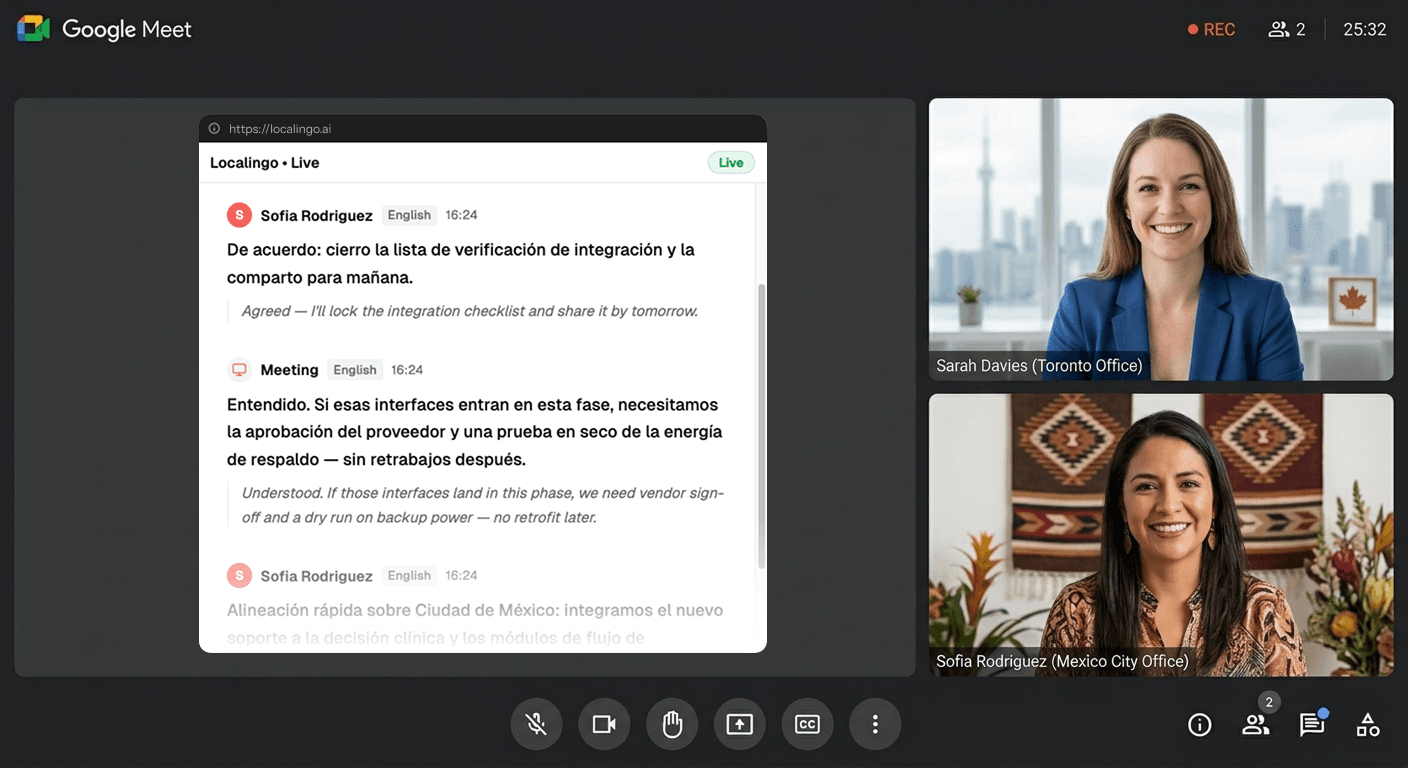
Únete a tu llamada de Meet como siempre
No cambia nada en cómo usas Google Meet. Usa el navegador o la aplicación de escritorio — Localingo funciona junto a cualquiera de los dos.
Permite el audio de pantalla cuando se te pida
Sin instalaciones, sin plugins, sin bots que se unan a tu llamada. Abre Localingo en una pestaña del navegador y concede acceso al audio de pantalla cuando el navegador lo pida — eso es todo lo que necesita para empezar a traducir.
Sigue cada palabra, en tu idioma
Los subtítulos en vivo aparecen mientras la gente habla, traducidos a tu idioma en tiempo real. Todo se guarda en tu historial de reuniones.
Lo que obtienes junto a cada llamada de Meet
Cada palabra traducida mientras se pronuncia
Tu llamada de Meet se transcribe y se traduce a tu idioma en cuestión de segundos — en más de 90 idiomas — para que sigas cada palabra en el momento, no un resumen con retraso.
Cada reunión guardada — transcripción y traducción, en tu idioma
Al terminar la llamada, cada sesión de Meet queda en tu panel — transcripción completa, traducción y un registro en el que puedes buscar. Las notas de Gemini salen en el idioma hablado de la reunión y no admiten sesiones multilingües. Localingo mantiene todo en tu idioma, desde cada plataforma, listo para funciones de IA que realmente trabajan para ti.
Your past meetings, saved and searchable.
Today
2Yesterday
2Permanece en pantalla mientras usas Meet
El modo Picture-in-Picture mantiene visibles los subtítulos y las traducciones incluso cuando Meet está en primer plano. Cambia entre ventanas con libertad — los subtítulos te siguen.
La traducción de Meet: limitada a 5 pares de idiomas y planes de pago.
Inglés emparejado con 5 idiomas — un par a la vez
La traducción de voz de Meet solo funciona entre inglés y español, francés, alemán, portugués o italiano. Toda la reunión tiene que usar un único par de idiomas — si los participantes hablan cualquier otro idioma, Meet no puede traducirlo. Localingo admite más de 90 idiomas sin esa limitación.
Requiere Google AI Pro o una suscripción a Workspace
Las funciones de traducción de Meet solo están disponibles en Google AI Pro, Google AI Ultra o determinados planes de Workspace. Las cuentas gratuitas de Google no las tienen. Localingo funciona con cualquier cuenta, sin necesidad de pagar más.
Gemini cubre 8 idiomas y no admite sesiones multilingües
Las notas de reunión de Gemini cubren 8 idiomas y explícitamente no admiten sesiones donde se habla más de un idioma. Localingo mantiene todo traducido a tu idioma después de cada sesión — y ese historial impulsará funciones de IA en todas tus reuniones, desde cualquier plataforma.
Localingo vs la traducción integrada de Meet
| Función | Localingo | Integrado en Meet |
|---|---|---|
| Traducción sin plan de pago | ✓ | Solo Workspace |
| Más de 90 idiomas | ✓ | Limitado |
| Funciona con cualquier aplicación de reuniones | ✓ | Solo Meet |
| Historial de reuniones | ✓ | ✗ |
| Notas con IA en tu idioma | ✓ | Solo el idioma de la reunión |
| Ningún bot se une a la llamada | ✓ | ✓ |
| Gratis para empezar | ✓ | ✓ |
Pruébalo en tu próxima llamada de Meet.
Gratis para empezar. Sin tarjeta de crédito, sin bots, sin configuración.
¿Ya tienes una transcripción? Tradúcela gratis →